
Executive Direct Technical Insights: Gemini 4 Neon × /swarm Protocol
Google Antigravity • Gemini 4 Neon / Hydrogen / Carbon • ADK 2.0 • Nov 2026 Blueprint
"One agent is a loop. A swarm is many loops held together by a protocol." ในช่วง 2 สัปดาห์ของเดือนพฤศจิกายน 2026 Google ได้เปิดตัวชุดระบบ Multi-Agent ครบวงจรใน Google Antigravity ได้แก่ /swarm พร้อม Gemini 4 Carbon (10 พ.ย.), Orchestrator พร้อม Gemini 4 Hydrogen (12 พ.ย.) และ Gemini 4 Neon ที่กลายเป็น Default Planner (18 พ.ย.) กฎทองของการใช้ Swarm มีเพียง 2 ข้อ: 1) ใช้ Swarm เฉพาะงานที่แตกเป็น Lane อิสระไม่แก้ไฟล์ชนกัน และ 2) ต้องมี @verifier ที่ใช้คนละโมเดลมาตรวจ Diff และรัน Test ทุกคำกล่าวอ้าง หากขาดข้อใดข้อหนึ่ง Swarm จะกลายเป็นแค่ Single Agent ที่แพงขึ้นเท่านั้น
1. จาก Single Agent สู่ Swarm Protocol: สถาปัตยกรรมอ้างอิงฉบับเต็ม
ปัญหาคอขวดของ Multi-Agent ยุคก่อน (Dynamic Subagents) คือทุกผลลัพธ์ต้องวิ่งกลับเข้า Context ของตัวแม่เพียงตัวเดียว ทำให้เมื่อโปรเจกต์ใหญ่หลายสิบไฟล์ Context ตัวแม่จะบวมและช้าที่สุดในระบบ Antigravity /swarm แก้ปัญหานี้ด้วยการเปลี่ยนที่คุยเป็น Shared Message Board แบบ Append-Only ที่ทุกคนอ่านประวัติเรียงลำดับร่วมกันได้
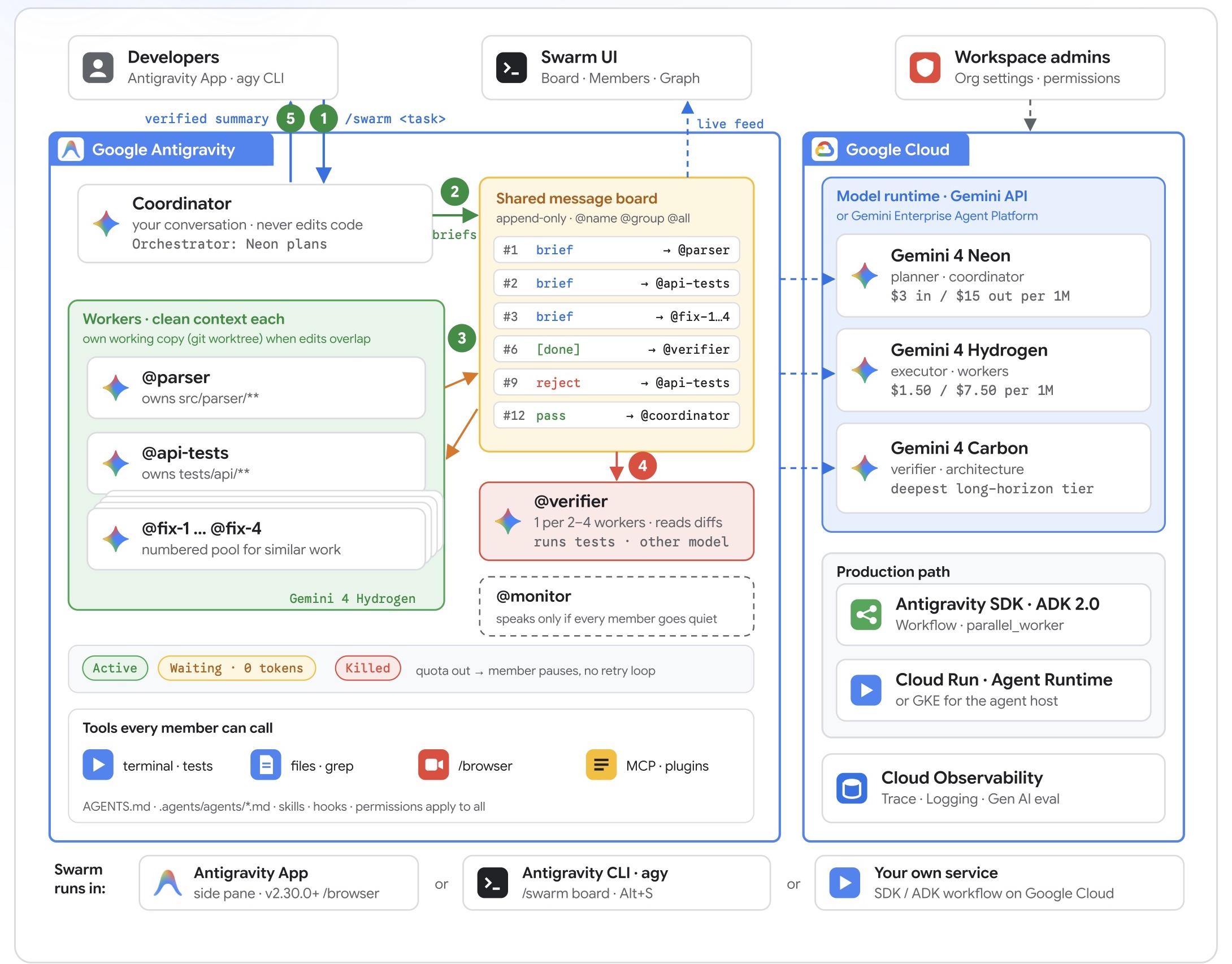
/swarm <task> เพื่อเปลี่ยนแชตปัจจุบันเป็น Coordinator → (2) กระจาย Brief ลงบอร์ดกลางแบบ Append-Only → (3) Workers รันใน Clean Context (แยก Git Worktree เมื่อแก้ไฟล์ซ้อนกัน) → (4) @verifier บนโมเดลที่ต่างกันอ่าน Diff + รัน Test และตีกลับหากผิด → (5) Coordinator สรุปผลที่ผ่านการตรวจสอบแล้วเพียงชุดเดียว
แบ่งงานเป็น Lane ที่ไม่ชนกัน (เช่น 1 Worker ต่อ 1 ไฟล์หรือ 1 Package)
ทุก Brief ระบุชัด: OWNS, MUST NOT TOUCH และ DONE MEANS
บอร์ดกลางแบบ Append-Only ไม่มีแชตลับ ตรวจสอบย้อนหลังได้ทุกคำสั่ง
ตั้ง @verifier 1 ตัวต่อ 2–4 Workers เพื่อจับผิด อ่าน Diff และรัน Test จริง
สมาชิกที่รอคิวจะหลับในสถานะ Waiting ด้วยต้นทุน 0 Token จนกว่าถูก @mention
2. จัดทัพโมเดลตระกูล Gemini 4 ให้ตรง 3 บทบาทหลัก (Neon • Hydrogen • Carbon)
ทีม Swarm ที่ดีต้องแยก "คนวางแผน", "คนลงมือทำเร็ว" และ "คนจับผิด" ออกจากกันอย่างเด็ดขาด Google จึงออกแบบรุ่นย่อยของ Gemini 4 ให้จับคู่กับทั้ง 3 ตำแหน่งพอดี:
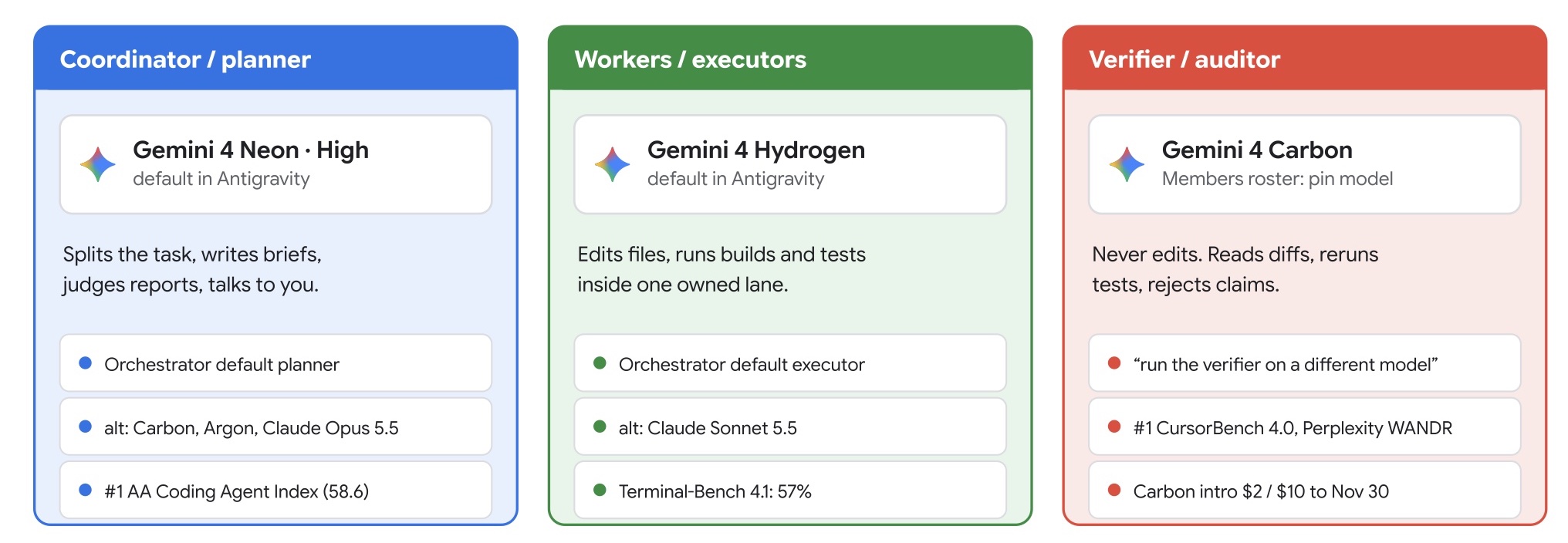
| บทบาทใน Swarm | โมเดลหลักที่แนะนำ | ราคา API (In / Out ต่อ 1M) | Benchmark & จุดเด่นสำคัญ |
|---|---|---|---|
| Coordinator / Planner | Gemini 4 Neon (High) | $3.00 / $15.00 | อันดับ #1 AA Coding Agent Index (58.6), #1 Zapier AutomationBench (56.3%), ต้นทุนต่องานต่ำกว่า Carbon 32% และมีอัตราการมโน (Fabrication Rate) ต่ำที่สุด |
| Workers / Executors | Gemini 4 Hydrogen | $1.50 / $7.50 (Cache Read $0.075/M) |
Terminal-Bench 4.1 สูงถึง 57% (มากกว่า 3.8 Flash ถึง 3 เท่า) ถูกกว่า Neon ครึ่งหนึ่ง เหมาะมากสำหรับรันหลาย Worker พร้อมกัน |
| Verifier / Auditor | Gemini 4 Carbon | $2/$10 (ถึง 30 พ.ย.) $4/$20 (ตั้งแต่ 1 ธ.ค.) |
อันดับ #1 CursorBench 4.0 & Perplexity WANDR ถนัดการไล่ตรวจเชิงลึกและ Adversarial Verification — อ่านเยอะแต่เขียนสั้น จึงคุ้มที่สุดในตำแหน่ง Verifier |
⚠️ ทำไม Verifier ต้องใช้คนละโมเดลกับ Worker? งานวิจัยของ Google Cloud ชี้ชัดว่า "โมเดลเป็นผู้ตัดสินงานตัวเองได้แย่และมักเข้าข้างผลลัพธ์ของตัวเอง" การเติมคำสั่งเพียงประโยคเดียวว่า "run the verifier on a different model than the workers" จะช่วยปิด Blind Spot ได้ทันที
3. สอนใช้งาน /swarm ทีละขั้น พร้อมภาพหน้าจอ Antigravity App จริง
ขั้นตอนที่ 1 — เริ่มต้น Swarm: ใน Antigravity App พิมพ์ /swarm กด Tab แล้วตามด้วยโจทย์ (หรือใน CLI agy กด Alt + S / พิมพ์ /swarm board เพื่อเปิดหน้าจอบอร์ดเต็มจอ) แชตปัจจุบันจะกลายเป็น @coordinator และขึ้นลิงก์ Open the Swarm UI (เปิดซ้ำได้ทาง Overview → Plugins → Swarm)
/swarm Add unit tests for the date utilities in src/utils/date.ts and the currency formatter in src/utils/currency.ts, and run npm test to verify.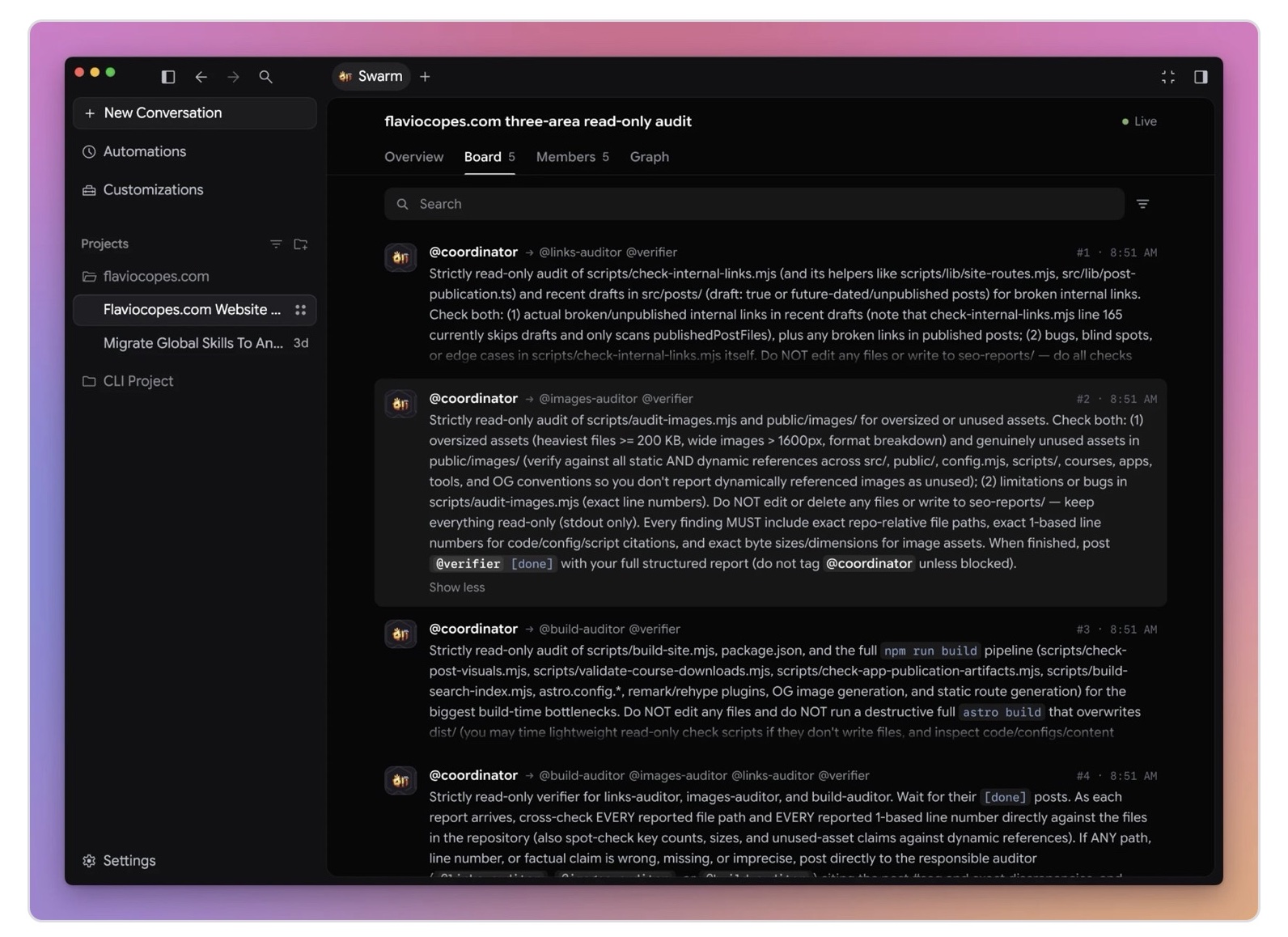
@coordinator โพสต์ Brief หมายเลข #1–#4 สั่งงาน @links-auditor, @images-auditor, @build-auditor และ @verifier แบบ Read-Only พร้อมระบุขอบเขต ข้อห้าม และรูปแบบรายงานชัดเจน (ภาพโดย Flavio Copes)
ขั้นตอนที่ 2 — ลำดับการโต้ตอบและการตีกลับบนบอร์ด (Append-Only): ทุกโพสต์บนบอร์ดมีเลขลำดับและลบแก้ไขเงียบๆ ไม่ได้ เมื่อ Worker โพสต์ [done] แท็ก @verifier หากตรวจเจอจุดผิด Verifier จะตีกลับให้เจ้าของ Lane แก้ไขจนผ่านก่อนส่งสรุปให้ Coordinator:
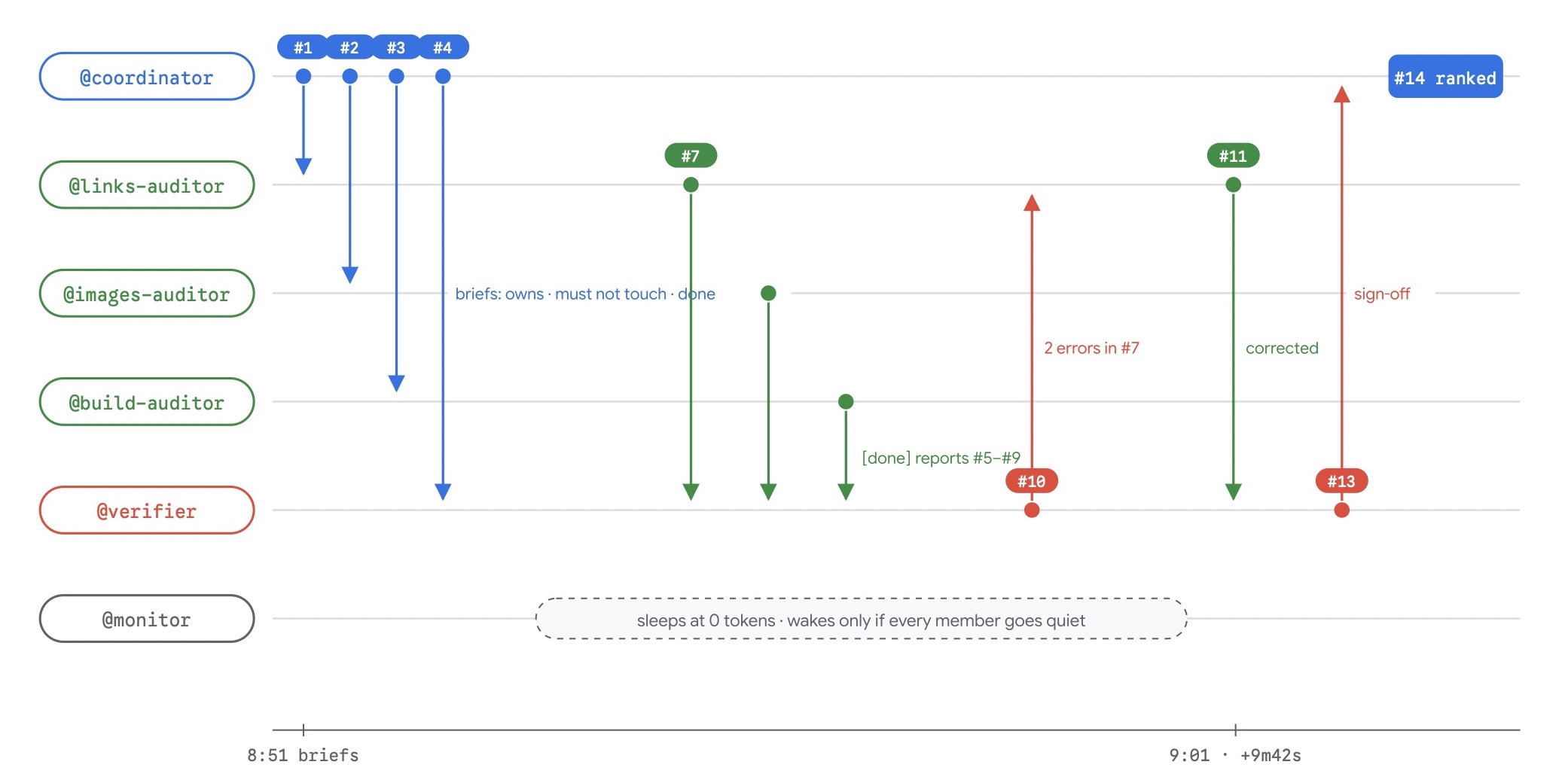
@verifier ตรวจเจอ 2 จุดผิดพลาดในโพสต์ #10 → @links-auditor แก้ไขส่งใหม่ในโพสต์ #11 (+9 นาที 42 วินาที) → Verifier อนุมัติใน #13 → Coordinator สรุปผลจัดอันดับใน #14 ส่วน @monitor นอนหลับที่ 0 Token ตลอดงานเพราะทีมเดินหน้าไม่สะดุด
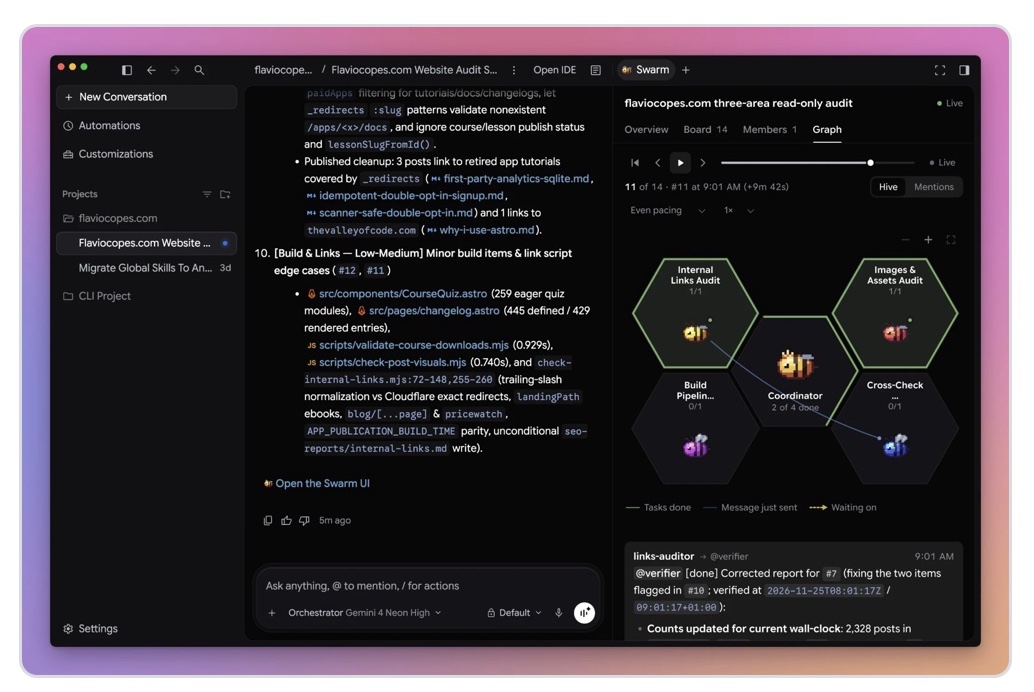
j/k เลื่อน, p กรองสมาชิก, f Follow, z ซูม, o เปิดแชตย่อยของ Worker เพื่ออนุมัติ Tool Call โดยตรง)
Waiting ใช้ 0 Token จนกว่าถูกแท็ก หากโควตาหมดสมาชิกจะ Pause ทันทีไม่วน Retry เปลืองโควตา และไม่ตื่นเองจนกว่าจะทักหรือสลับโมเดล
เมื่อหลาย Worker ต้องแก้โค้ดหรือ Build พร้อมกัน Coordinator จะแตก Git Worktree แยกให้แต่ละตัว (ต้อง Merge/Land งานก่อนลบ Worker เสมอ)
@monitor จะเงียบตลอดถ้างานเดินหน้า และจะโพสต์ปลุกเฉพาะตอนที่สมาชิกทุกคนเงียบหมดก่อนงานเสร็จ
4. Orchestrator: ระบบ 2 โมเดลในแชตเดียว (ไม่ใช่แค่ Router ธรรมดา!)
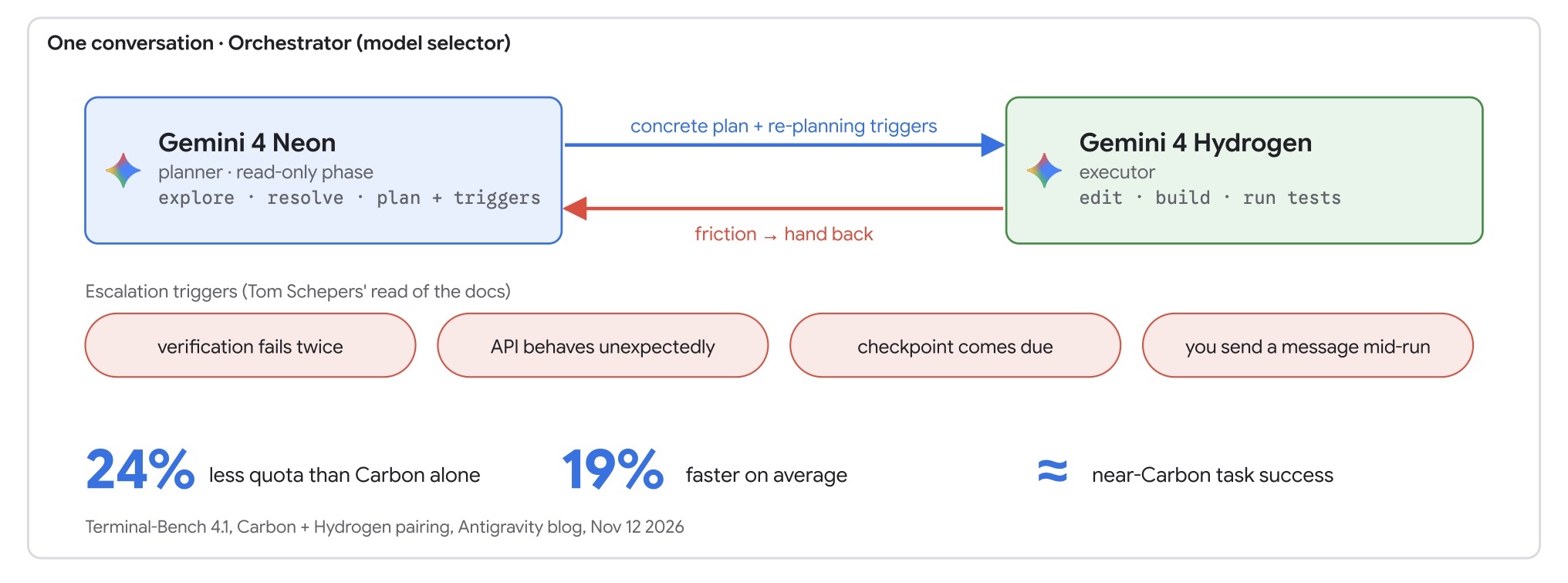
ในแชตของ Coordinator เอง ควรตั้งค่าเป็นโหมด Orchestrator (Settings → Models → Orchestrator Settings หรือคำสั่ง /model ใน CLI) ซึ่งจับคู่ Gemini 4 Neon (Planner โหมด Read-Only) กับ Gemini 4 Hydrogen (Executor) แบบวนกลับสองทาง (Bidirectional Loop)
5. เลือกใช้คำสั่งไหนดี? (Decision Tree เทียบ 7 รูปแบบใน Antigravity)
เอกสารทางการของ Antigravity ย้ำชัดเรื่อง "เมื่อไหร่ไม่ควรใช้ /swarm" โดยสามารถจำด้วยสูตร 5 บรรทัดยอดนิยมของ @thtbee_:
"งานซ้ำเดิม = /run-workflow • หลายไฟล์แยกได้ = /swarm • บั๊กยาก 1 จุด = /boost • งานยาวหลายวันมี Milestone = /teamwork • นอกนั้นทั้งหมด = Orchestrator"
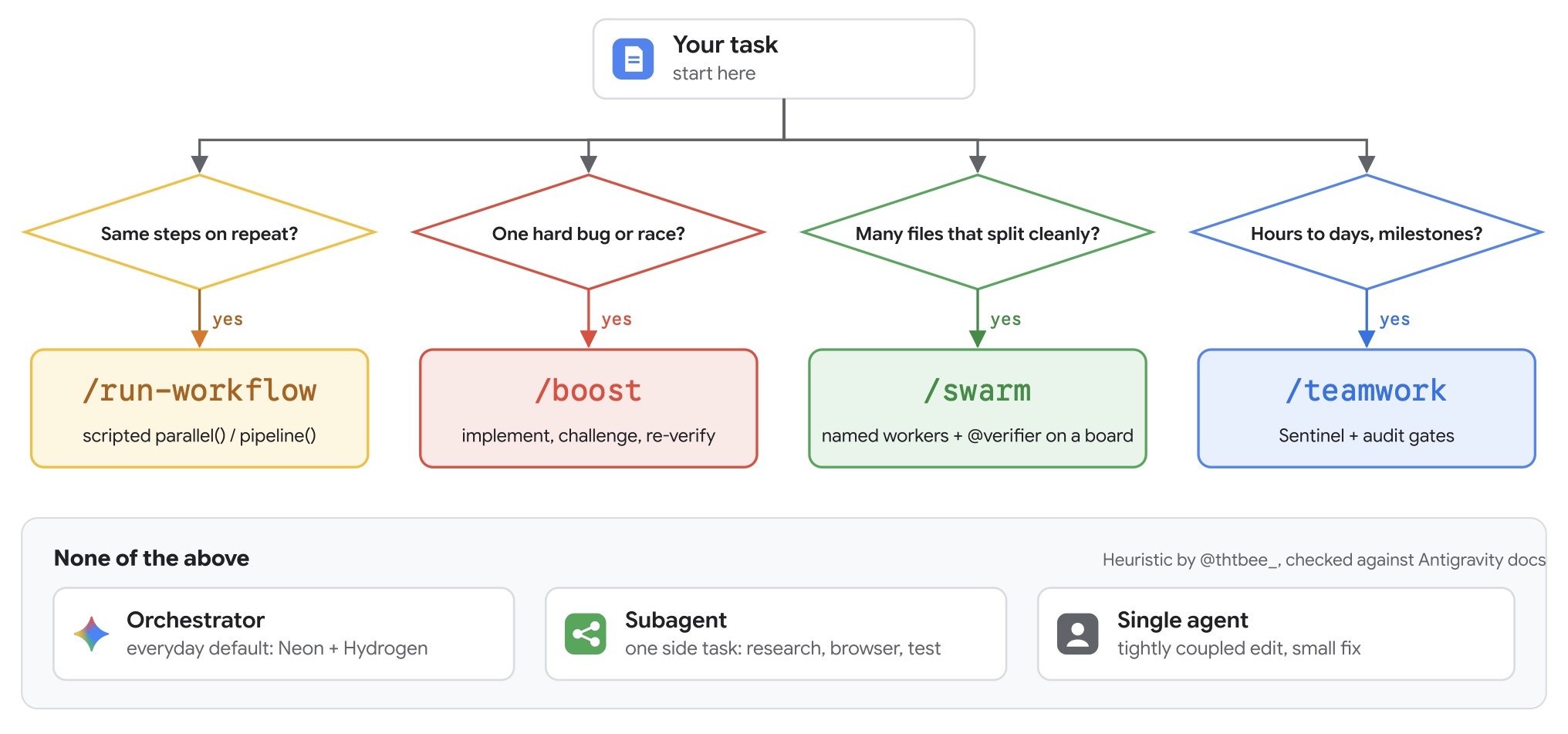
/boost เน้นเจาะลึก 1 ปัญหา (DeepCoder/DeepInvestigator), /swarm เน้นกระจายกว้างหลายไฟล์พร้อมกัน, /teamwork เน้นโปรเจกต์ยาวหลายวันพร้อมด่านตรวจ 4 ชั้น (Critic, Challenger, Auditor, Success Auditor)
6. 5 รูปแบบ Multi-Agent ที่พิสูจน์แล้วด้วยงานวิจัย (Google + MIT)
อ้างอิงบทความวิจัยของ YK Sugi (Google Cloud) ที่เตือนว่านักพัฒนาจำนวนมากยังจัดทีม Agent แบบ "เดาเอา (by vibe)" ทั้งที่ตัวเลขวิจัยชี้ทิศทางชัดเจนมาก:
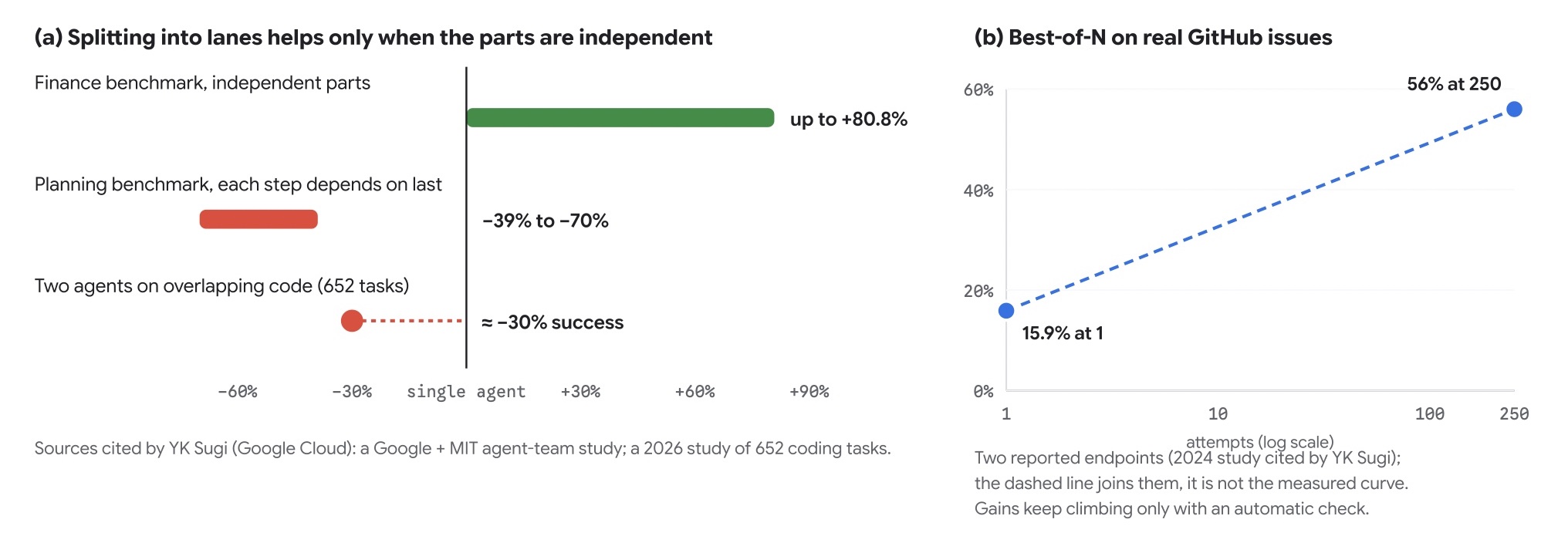
- Separate Builder & Verifier: คนสร้างกับคนตรวจต้องอยู่คนละ Thread และคนละโมเดล
- Split Work into Lanes: แบ่งเจ้าของชัดเจน (Frontend / Backend / Docs) ห้ามแก้ไฟล์เดียวกัน
- Best of N: สร้าง
@try-1ถึง@try-4แยก Worktree แข่งกัน Optimize แล้วให้@verifierรัน Benchmark เลือกผู้ชนะ - Council of Models: สำหรับงานดีไซน์/สถาปัตยกรรมที่ไม่มี Unit Test ให้ส่ง Neon + Carbon + Claude Opus 5.5 ออกแบบแยกกัน แล้วให้กรรมการ 3 ตัวให้คะแนนแบบปิดชื่อโมเดล (Blind Judging)
- Team of Reviewers: ตั้ง Reviewer แบบ Read-Only แยกมุมมอง (
@ux,@simplicity,@edge-cases,@security) — งานวิจัยพบว่าตรวจเจอบั๊กมากกว่าใช้ Checklist เดียวกันถึง +35%
7. เจาะลึก 6 Case Studies จริง พร้อมตัวเลขผลลัพธ์
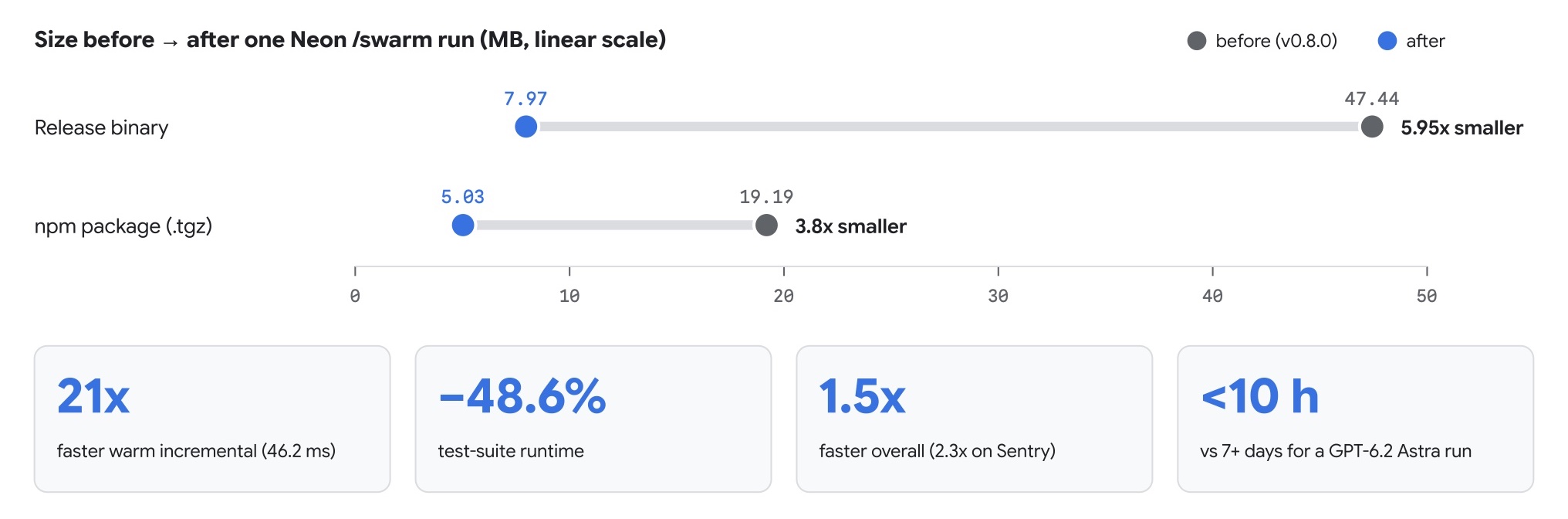
/swarm ด้วย Gemini 4 Neon ลดขนาด Release Binary จาก 47.44 MB เหลือ 7.97 MB (เล็กลง 5.95 เท่า), npm package จาก 19.19 MB เหลือ 5.03 MB, Warm Incremental Build เร็วขึ้น 21 เท่า (46.2 ms) และ Test Suite เร็วขึ้น 48.6% จบใน <10 ชม. เทียบกับรัน GPT-6.2 Astra เดิมที่ใช้เวลาเกิน 7 วัน
1) Website Read-Only Audit (Flavio Copes)
ใช้ 5 ตัวบน Hydrogen ตรวจเว็บทั้งหมด เจอไฟล์รูปไม่ได้ใช้ 233 MiB, ไฟล์ค้าง 1,079 ไฟล์ และสคริปต์เดิมที่พลาดรูป 3,021 รูป Verifier จับผิดรายงาน #7 ได้ 2 จุดก่อนสรุปผล ใช้โควตา ~4–5× ของ Single Agent
2) Skycrest Archipelago 3D World (Docs)
สร้างโลก 3D จากโฟลเดอร์ว่างใน 1 Prompt แบ่ง 4 ตัว (@world, @physics, @gameplay, @verifier) รัน node --test 12 เคส + เปิด /browser เช็ก 0 Console Errors
3) Mustache Protocol (/grill-me → /swarm)
เริ่มด้วย /grill-me ให้ AI สัมภาษณ์เก็บ Requirement จนได้ Implementation Plan ก่อนแล้วค่อยสั่ง /swarm execute our plan เป็น Workflow ที่ลดความพลาดของ Coordinator ได้ดีที่สุด
4) HappyDelivery Swarm on Google Cloud
ระบบสั่งของชำด้วย LangGraph + Gemini Flash/Pro Supervisor ใช้เพียง 4,240 Tokens ต่อ 3 เทิร์น ($0.0061/ออเดอร์ หรือ $0.0033 เมื่อเปิด Caching) แก้ปัญหาหน่วง 2–4 วิด้วยการส่งข้อความสถานะทันที
8. แจก 7 สูตร Swarm Prompt Pack พร้อมก๊อปปี้ + โค้ดต่อยอด ADK 2.0
กฎ 5 ข้อในการเขียน Swarm Prompt: 1) ระบุคำสั่งพิสูจน์ผล (Proof Command) • 2) ระบุ Lane เจ้าของไฟล์ • 3) บังคับอ้างอิง File Path + หมายเลขบรรทัด • 4) สั่งห้ามลบ Test Assertions • 5) เริ่มจาก Read-Only Audit ก่อนเสมอ
# 1. Read-Only Audit (ปลอดภัยที่สุดสำหรับเริ่มใน Repo ใหม่)
/swarm Audit this repository's tests and docs in parallel: have @test-audit list untested edge cases, @docs-audit check README commands against project scripts, and @verifier cross-check both reports on the board.

# 2. Cross-Model Race Check (บังคับ Verifier คนละโมเดล)
/swarm Add retry with exponential backoff to the HTTP client in pkg/httpclient and the webhook sender in pkg/webhooks. Run the verifier on a different model than the workers, and have it check for race conditions and run go test -race ./...

# 3. Multi-Package Repair (ห้ามลบ Assertion)
/swarm Run pytest across the repository, group the failing tests by package, assign one worker per broken package to fix the failures without deleting assertions, and have a verifier re-run the full suite.

# 4. Plan First, Then Swarm (สูตรลดพลาดสูงสุด)
/grill-me to create an implementation plan for <feature>
/swarm execute our plan

# 5. Best of N (แข่ง Optimize แยก Worktree)
/swarm Create @try-1 to @try-4. Each optimizes src/search/rank.ts in its own working copy without changing its public API. @verifier runs npm run bench and npm test on every attempt, posts a table, and the coordinator keeps the fastest passing one.

# 6. Council of Models (Blind Judging 3 โมเดล)
/swarm Ask @design-neon (Gemini 4 Neon), @design-carbon (Gemini 4 Carbon) and @design-opus (Claude Opus 5.5) for one independent design of the new settings page each. Three fresh judges score them with model names hidden. Merge the best ideas into one spec and stop. Read-only.

# 7. Migration by Package (ย้ายไลบรารีทีละแพ็กเกจ)
/swarm Migrate packages/* from the old logger to src/log/index.ts. One worker per package, own working copy each, never edit src/log/. Done means pnpm -r test and pnpm -r typecheck pass. @verifier runs both after every [done] and rejects any change to test files.
ขยายสู่ Production Service นอก Antigravity App: เมื่อมี Swarm ที่ต้องรันซ้ำตามตารางเวลาหรืออยู่หลัง API ให้ยกระดับเป็น Dynamic Workflow (/run-workflow), Antigravity SDK (pip install google-antigravity) หรือ Google ADK 2.0 Graph Workflow บน Cloud Run / GKE โดยใช้ parallel_worker=True และ Event(route=...) (ข้อควรระวัง API: ห้ามส่ง thinking_budget ไปที่ Gemini 4 Neon เพราะจะคืน HTTP 400 และต้องเก็บ Thought Signatures ข้ามเทิร์นเสมอ)
9. คำนวณต้นทุนจริง + Pre-Launch Checklist 9 ข้อก่อนกดรัน /swarm
| สมาชิกใน Swarm (ตัวอย่าง 5 ตัว) | สมมติฐาน Token (In / Out) | ค่าใช้จ่าย API |
|---|---|---|
| Coordinator (Gemini 4 Neon) | 300K / 30K | $1.35 |
| 4 Workers (Gemini 4 Hydrogen) | 4 × (600K / 60K) | $5.40 |
| Verifier (Gemini 4 Carbon ราคา ธ.ค.) | 400K / 20K | $2.00 |
| รวมทั้งหมด (ไม่ใช้ Cache) → เมื่อใช้ 80% Worker Cache ($0.075/M) | Prefix คงที่ ≥ 4,096 tokens (AGENTS.md) | $8.75 → $6.01 |
✅ Pre-Launch Checklist 9 ข้อก่อนสั่ง /swarm
- ☑️ งานนี้แตกเป็น Lane ที่ไม่มีไฟล์ซ้อนทับกันได้จริงหรือไม่?
- ☑️ เขียนนิยามคำว่า "Done" เป็นคำสั่งรันจริง (เช่น
npm test) หรือผลตรวจที่มองเห็นได้ไว้ใน Prompt แล้วหรือยัง? - ☑️ ตั้ง Coordinator เป็น Orchestrator (Neon + Hydrogen), Workers เป็น Hydrogen และ Verifier เป็นคนละโมเดล (Carbon) แล้วหรือยัง?
- ☑️ ระบุใน Brief ให้ทุกรายงานอ้างอิง Repo-Relative Path + หมายเลขบรรทัดแบบ 1-based แล้วหรือยัง?
- ☑️ งานที่มี Build หรือแก้ไฟล์พร้อมกัน แยก Git Worktree ให้แต่ละ Worker แล้วหรือยัง?
- ☑️ ใส่คำสั่งห้ามลบ Test Assertions หรือข้าม Test แล้วหรือยัง?
- ☑️ เช็กโควตาคงเหลือว่าพอสำหรับรันระดับ 4–5 เท่าของ Single Agent แล้วหรือยัง?
- ☑️ อัปเดตไฟล์
AGENTS.mdให้เป็นปัจจุบันเพื่อให้ทุก Worker แชร์กติกาและได้ Implicit Caching ≥ 4,096 Tokens หรือยัง? - ☑️ พร้อมเปิดดูแท็บ Board และ Graph ระหว่างรันครั้งแรกเพื่อควบคุมทิศทางแล้วหรือยัง?
ดูหลักสูตร AI Thinking & Agentic Workflow หรือสำรวจคลัง Agent Skills & Prompts พร้อมใช้งานทันที